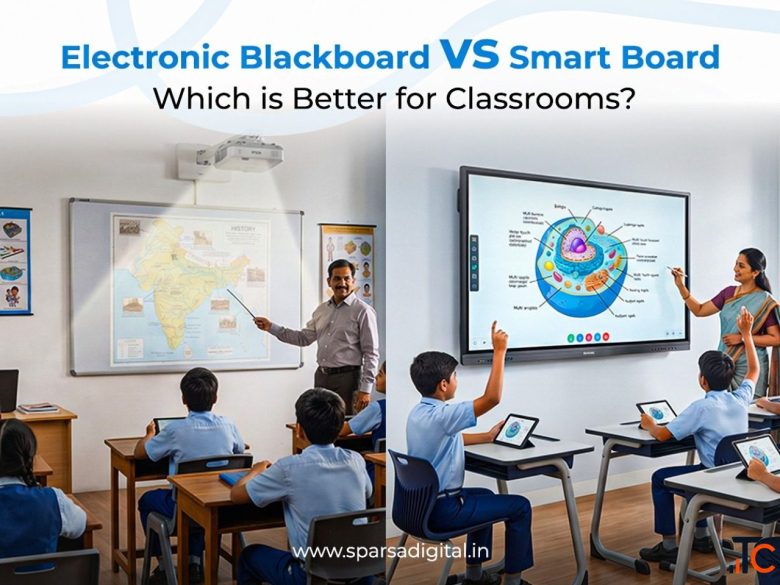
Electronic Blackboard vs Smart Board Which is Better for Classrooms
Check with seller
Location
Gurgaon, Haryana — India
Published
2026-08-10 18:03:28
Contact
Sparsa Digital
Description
Table of contents
What is an Electronic Blackboard?
Core Features of an Electronic Blackboard
Electronic Blackboard vs Smart Board: Comparison Table
Key Takeaway from the Table
Electronic Blackboard vs Digital Whiteboard
What is a Digital Whiteboard?
Side-by-Side: Electronic Blackboard vs Digital Whiteboard
Winner for Classroom Use: Electronic Blackboard
Which is Better for Indian Classrooms?
The Indian Classroom Reality
Government Initiatives Supporting Electronic Blackboards
Verdict: Electronic Blackboard Wins for Indian Classrooms
Price Comparison
Electronic Blackboard Price Segments in India (2026)
Smart Board Price in India (2026)
Hidden Costs to Factor In
Bulk Purchase Discounts
Where to Buy in India
1. Authorised Brand Distributors
2. Government e-Marketplace (GeM Portal)
3. Online Marketplaces
4. Education Technology Exhibitions
5. Local IT Hardware Dealers
FAQs
Final Verdict
The classroom of 2026 looks nothing like it did a decade ago. Dusty chalk boards have given way to gleaming digital displays, and teachers are no longer limited to markers and eraser dust. Two technologies dominate today’s education technology conversation: the electronic blackboard and the smart board. Both promise to transform learning, but they do it differently, and at very different price points.
What is an Electronic Blackboard?
An electronic blackboard is a large-format interactive display panel that serves as a digital replacement for the traditional chalkboard or whiteboard. It combines a high-definition LCD or LED screen with touch-sensitive technology, allowing teachers and students to write, draw, annotate, and interact with content directly on the surface using fingers, a stylus, or a special pen.
Think of it as a giant tablet mounted on your classroom wall. You can write on it like a blackboard, display slides and videos like a projector screen, connect it to a computer or the internet, and save everything you write with a single tap.
Core Features of an Electronic Blackboard
1. Touch and Writing Input Modern electronic blackboards support multi-touch input, meaning multiple students can interact with the board simultaneously. The writing experience is smooth and responsive, closely mimicking the feel of writing on paper.
2. Built-in Android or Windows OS Most mid-to-premium range electronic blackboards come with an embedded operating system (usually Android 11 or Windows 10/11), which means they work as a standalone device without needing a separate computer.
3. High-Resolution Display Screens typically range from 55 inches to 110 inches diagonally, with 4K Ultra HD resolution becoming the standard. This ensures that even students sitting in the back row can see content clearly.
4. Wireless Screen Mirroring Teachers can wirelessly cast their laptop, tablet, or smartphone screen to the board using Miracast, AirPlay, or proprietary apps. No cables, no adapters, no fuss.
5. Digital Pen and Annotation Tools Built-in software allows freehand writing, highlighting, drawing geometric shapes, inserting images, and annotating over any content, including PDFs, websites, and YouTube videos.
6. Saving and Sharing Notes Everything written on the board can be saved as a PDF or image and shared via email, WhatsApp, or a school management app instantly. Students no longer need to frantically copy notes before the board is erased.
7. Multiple Connectivity Ports HDMI, USB-A, USB-C, and SD card slots are standard. Most models also offer built-in Wi-Fi and Bluetooth.
Electronic Blackboard vs Smart Board: Comparison Table
The terms “electronic blackboard” and “smart board” are often used interchangeably in casual conversation, but they are distinct products with different architectures, use cases, and price points. Here is a detailed side-by-side comparison:
Feature Electronic Blackboard Smart Board
Technology LED/LCD flat panel with infrared or capacitive touch Projector-based or flat panel with proprietary touch technology
Display Type Direct-view LED/LCD screen Projection surface (older) or flat panel (newer SMART boards)
Resolution 4K UHD (3840 × 2160) standard 1080p Full HD (4K available in premium models)
Touch Points 10-40 simultaneous touch points 10-20 touch points (varies by model)
Built-in OS Android / Windows Android / Windows (varies by model)
Writing Experience Smooth, pen-on-glass feel Good, but software-dependent
Glare / Visibility Low glare, anti-glare coating common Older projection models suffer in bright rooms
Maintenance Minimal- no lamp or projector to replace Projector lamp replacements (older models); panels need care
Durability High- solid state display, 50,000+ hour lifespan Moderate to High- projectors wear faster
Setup Complexity Simple wall mount and power on May need projector alignment and calibration
Software Ecosystem Open Android/Windows + proprietary app Proprietary SMART Learning Suite (subscription)
Collaboration Tools Built-in whiteboard, screen share, multi-user SMART Learning Suite, Notebook software
Connectivity HDMI, USB, Wi-Fi, Bluetooth, OPS slot HDMI, USB, Wi-Fi (model dependent)
Screen Size Options 55″, 65″, 75″, 86″, 98″, 110″ 55″, 65″, 75″, 86″ (SMART MX series)
Price Range (India) ₹40,000 – ₹3,00,000+ ₹1,50,000 – ₹6,00,000+
Brand Examples ViewSonic, BenQ, Maxhub, Iball, Philips SMART Technologies, Promethean, Clevertouch
Best For Schools, colleges, coaching centres, budget buyers Premium corporate, international schools
After-Sales Support (India) Good- many local